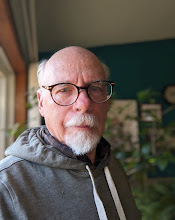
As I said in a previous post, one of the purposes of this blog is to talk about myself, and try to make it interesting. Which is a task. However, buckle in, we've got an thrill packed entry this week. The subject is; how I write my stories.
Disclaimer; For every statement I make, attach an "ideally" to it. I'm going to describe how, ideally, I write my stories. Things can, and do go south, but rather than elaborate in all the ways they can and do, just use your imagination. Today we're writing in an ideal world.
First off, I spend upwards of three months daydreaming story, a minute here, another minute there, throughout the day; imagining scenes, building a plot from opening to the final scene. I may do a little handwaving in the middle, which I then have to invent when I come to it, but generally it is only after I have the story in my head to tell, that I start setting it down in words.
In my more recent books I've been writing down chapters as bullet points and noting them on a calendar in my notes to keep everything straight in my mind. This was not always the case. And even when I do, not all the chapters are set out in advance.
I write my stories using LibreOffice on a Windows machine. LibreOffice is a free suite of applications similar to MS Word. I can save my files as Word documents when required, and export them as PDFs or ePubs. It offers all I need to both write and produce a book. I write my stories from beginning to end, so I don't need one of those fancy writing programs like Scrivener.
I start by naming the manuscript file with the project name, month and date, and then save it to the "First Draft" folder on both my computer's hard drive and a microSD card. The following morning I open it and immediately save it using that day's date. Thus, every day's work is on a new file saved in two places, ensuring that I'll never lose more than a day's work if I screw something up. Every so often I upload the current copy to my Google Drive as an extra precaution.
I work to time rather than word count. I write the first thing every morning, every morning until nine, when I have breakfast. This time may be up to two hours, and almost certainly one hour each day. Sometimes, when writing is going well, I return to work in the evening adding another hour or two to the day's total. The great advantage to me is that hours just fly by unnoticed when I'm writing.
LibreOffice underlines misspellings (or what it thinks are misspellings) the extra spaces between words, double words (maybe), and "a"s before words starting with vowels. Pretty basic. A lot of room for errors to go unmarked.
One of the things, of many, I've learned over the years is to add all my invented names and words to LibreOffice's dictionary as I invent them. This prevents them from being underlined in red in the text. This is very helpful when, ten or a hundred pages later, I write Teaf and it gets underlined, letting me know that it should be Taef. I read words as shapes and so these slight variations go unnoticed by me. This simple precaution saves my poor beta readers a lot of grief.
The first draft of a full length novel takes me between three and four months to complete. The happiest day of the whole process is the day I finish the first draft. Putting words on a blank screen is the hardest part of writing for me. Once I have words on screen to tinker with, I'm happy a happy camper.
At this point, I believe a lot of writers might ship the ms off to their beta readers. But I don't. I'm old fashion. I didn't have access to beta readers back in the '70's. More over I view it as a painting in words, a work of art which I feel should be a personal reflection of my art rather than a product. Some people will like it, others won't. I accept that. A more practical reason is that this version is so riddled with typos, I haven't the heart to make anyone but myself, who is blind to typos, read it. For me, beta readers come at the end of the process to polish up the nearly finished work.
I usually start my second draft the day after I finish the first one. I don't, as some suggest, put it aside for a while. Those first chapters are already three or more months ago; enough time has past to get back to them again. I usually add about 10% more words with the second draft; mostly by fleshing out conversations and scene settings. I rarely do extensive revisions in the second draft. My focus is on making the text read better, by, for example, moving phases from the end of sentences to the beginning, where they belong, I blame my German ancestors for this tendency to tack phrases on at the end, as an after thought. I also try to eliminate as many "and"s as possible, and break up run-on sentences. In general, I try to come up with a more clever way of saying what I've written on the page. But I generally follow what I've written, so I try to be careful to get what I want right in the first draft. This second draft may take only a couple of weeks to complete.
After the second draft, I upload the file to Google Drive for the third draft. Hopefully this involves just minor tweaks to phrases and such. Drive has a grammar checker of sorts, so it finds some of the correctly spelled wrong words, i.e. "its" vs "it's", "where" vs "were", etc., which LibreOffice doesn't. And because the text looks different, it makes reading the third draft different enough to highlight any issues. With the third draft done, I should feel confident enough to say "done." If I have an uneasy feeling that I can't, I'll go over it again until I can.
Every story is a little different, and each had a slightly different path. For example, when I get stuck in the middle, I'll go back to the start and treat it like the second draft, so that the first half of some of my books might have four or five drafts. Because I queried The Girl on the Kerb to agents, I had six months to revisit it before I published it myself, so it is probably the most revised book of mine.
Altogether the second and third draft will take only about a month plus. Next comes the proofing. I hate the proofing process. Such a pain. It is a four step process.
First, I download the Google Doc final version to Libre Office as a word document.
Second, I then upload it, chapter by chapter, to the free web version of Grammarly. I ignore all the grammar advice - you have to pay for most of it anyway - I just correct all the wrong words it finds that Google Drive overlooked, and put in commas where Grammarly thinks they should be, and maybe, take one or two out where it thinks they shouldn't be. Because I'm writing this not only as a book, but as the script for the auto-narrated audiobook, I will put commas in where I think a narrator might pause when speaking the line, whether or not it's grammatically correct. After making the indicated corrections, I download the corrected chapters to their own folder on my computer.
Third, I then copy and paste these corrected chapters, one by one, into the free online version of Scribbr's grammar app, where I correct the wrong words Google and Grammarly missed, and consider where it thinks commas should go. I then copy and past the corrected version into a single document on my computer, chapter by chapter.
And finally, I re-format the downloaded chapters into my standard format, a completed story once more. Once done, I print out a paper copy of the story using 1 1/2 spacing for my first human proofreader, my wife, to look over. Between Google, Grammarly, and Scribbr, her job is a whole lot easier these days. Once I've made her corrections, and listen to, and usually act, on her story suggestions, I offer the story to my kind beta readers in their preferred format to find all the remaining errors and offer any suggestions.
And with that, my author's job is done and I have to put on my publisher's hat, to get the story out the door. In the next installment, I'll take you through how I make a book out of the manuscript, and publish it. I know you can't wait, but it will have to be at least two week because:
THE POISON-PILL AND THE PAWNS' GAME WILL BE RELEASE ON AMAZON ON JUNE 18TH AS AN EBOOK, FOR $2.99 AND SHORTLY AFTERWORDS AS AN $3.99 AUDIO BOOK.
THE FREE VERSION OF BOTH THE EBOOK AND AUDIOBOOK SHOULD BEGIN TO APPEAR IN YOUR FAVORITE NON-AMAZON ONLINE BOOKSHOP BEGINNING ON JUNE 17TH WHEN I UPLOAD IT TO DRAFT2DIGITAL AND THE GOOGLE PLAY STORE. OTHER RETAILERS WILL ADD IT IN THE DAYS FOLLOWING. I WILL POST LINKS TO THOSE SITES AFTER PUBLICATION.
Stay tuned!